Automatic AI subtitles
Upload your audio or video and generate synced subtitles and their translation into 53 languages, with nothing to install.
3.0 out of 5 · 2 reviews
Restricted content
Sexually explicit, pornographic or similar content is not translated. If you upload this kind of material, the translation will be rejected and not processed. Please only use appropriate content (movies, series, podcasts, documentaries, etc.).
Select your file
Drag audio or video here
or click to choose (MP3, WAV, MOV, MP4, etc.)
You get 5 free minutes of audio per week.
What is Voxlate?
Voxlate is an AI subtitle generator that runs in your browser, with nothing to install. You upload an audio file (MP3, WAV, M4A, AAC, FLAC, OGG or WMA) or a video (MP4, MOV, MKV, WEBM, AVI, FLV, WMV or M4V), pick the language of the audio and the target language, and Voxlate delivers two synced subtitle files: the transcript in the original language and its translation. Whisper, a speech recognition model, does the transcription, and an AI language model does the translation. There are 53 languages available and four download formats: SRT, WebVTT, ASS with a word-by-word karaoke effect, and JSON with the start and end time of every word. The original audio is deleted as soon as processing finishes. You get 5 free minutes of audio every week; for longer files you can pay per file from USD 2 or pick a monthly plan.
See Voxlate in action
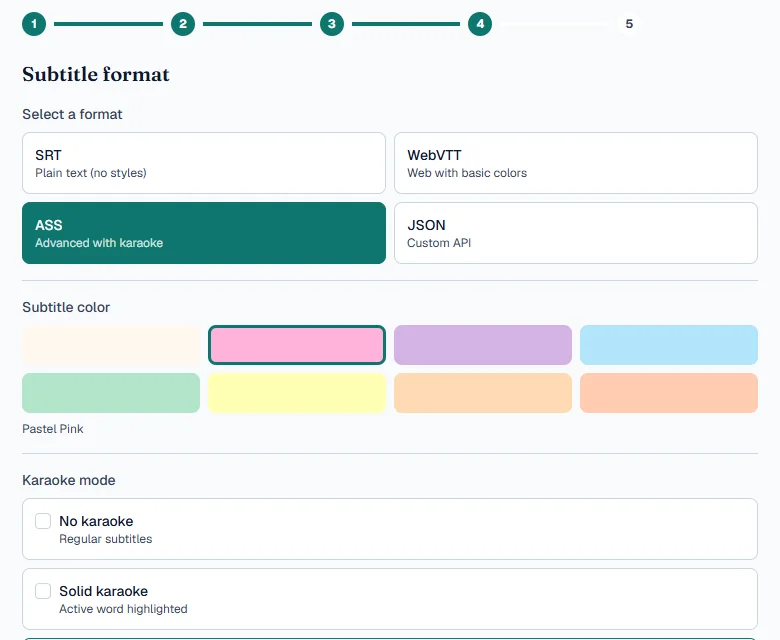
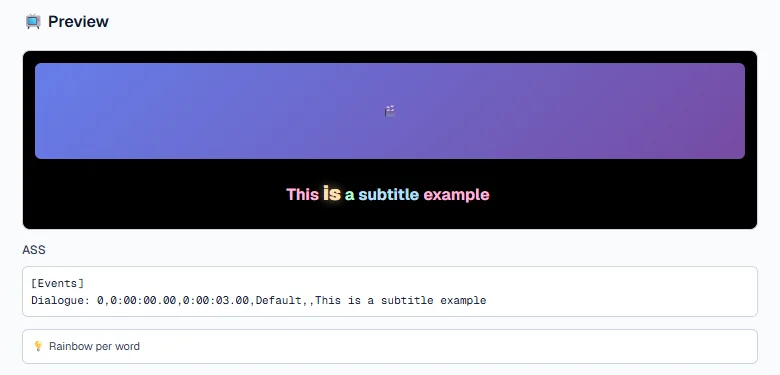
Download your subtitles as SRT, VTT, ASS and JSON
Pick the format you need: SRT for any player, WebVTT for the web, ASS for styled subtitles and JSON with the timing of every word.
Animated karaoke-style subtitles
With the ASS format you can create animated subtitles that highlight each word as it is spoken, in solid or rainbow karaoke mode, and pick the color from 8 pastel shades.
Subtitle format comparison
| Format | Color | Karaoke | Per-word timing | Best for |
|---|---|---|---|---|
| SRT | No | No | No | Any player, YouTube and video editors |
| WebVTT | Yes, basic colors | No | No | Web video (HTML5 <track> element) |
| ASS | Yes, 8 colors | Yes, solid or rainbow | Yes, inside the karaoke effect | Animated subtitles; VLC, mpv or burned in with FFmpeg |
| JSON | As data | As data | Yes, start and end of every word | Developers and custom workflows |
How to create automatic subtitles
- Upload your audio or video file (MP3, WAV, MP4, MOV).
- Choose the format, the color and the karaoke style.
- Whisper transcribes, an AI translates and you download your subtitles.
Try it free: you get 5 minutes of audio every week.
Translate your subtitles into 53 languages
Voxlate transcribes the audio with Whisper and an AI translates the subtitles into English, Spanish, French, Portuguese, German, Italian, Japanese, Korean, Chinese, Arabic, Hindi and many more languages.
Frequently asked questions
How do I generate automatic subtitles for a video?
Upload the audio or video file, choose the format and style, and Voxlate transcribes the audio with Whisper and gives you subtitles ready to download in minutes.
Can I create subtitles from an MP3?
Yes. You can upload audio as MP3, WAV, M4A, AAC, FLAC or OGG, and video as MP4, MOV, MKV, WEBM or AVI.
Which formats can I download the subtitles in?
SRT for any player, WebVTT for the web, ASS for styled and karaoke subtitles, and JSON with the timing of every word.
Is Voxlate free?
You get 5 minutes of audio free every week. If you need more, you can pick a plan or pay for just that file.
What happens to my audio file?
The original audio is deleted as soon as processing finishes. Only the generated subtitles are kept so you can download them.
Do I need to install anything?
No. Voxlate works in the browser, on your computer or your phone.
More Voxlate tools
Made by Juan Zaldívar · Updated